Most Shopify brands deploy AI agents the wrong way.
They connect an AI chatbot to their helpdesk, write a few FAQs, and expect the deflection rate to climb.
Then it does not.
Customers get wrong answers. Agents keep intervening. The AI confidently resolves the wrong things and escalates the things it should have handled. CSAT drops. The team loses faith in the project. Someone calls it a failed experiment.
The AI was not the failure. The missing step was everything that should have happened before the AI was deployed.
Because AI agents are only as good as the operational system underneath them.
If your ticket classification is a mess, your AI will be confused. If your policies are undocumented or inconsistent, your AI will be inconsistent. If your flows do not exist on paper before they exist in code, your AI will improvise in the worst possible moments.
The work that determines 80% of your AI support outcome happens before you write a single prompt or connect a single integration.
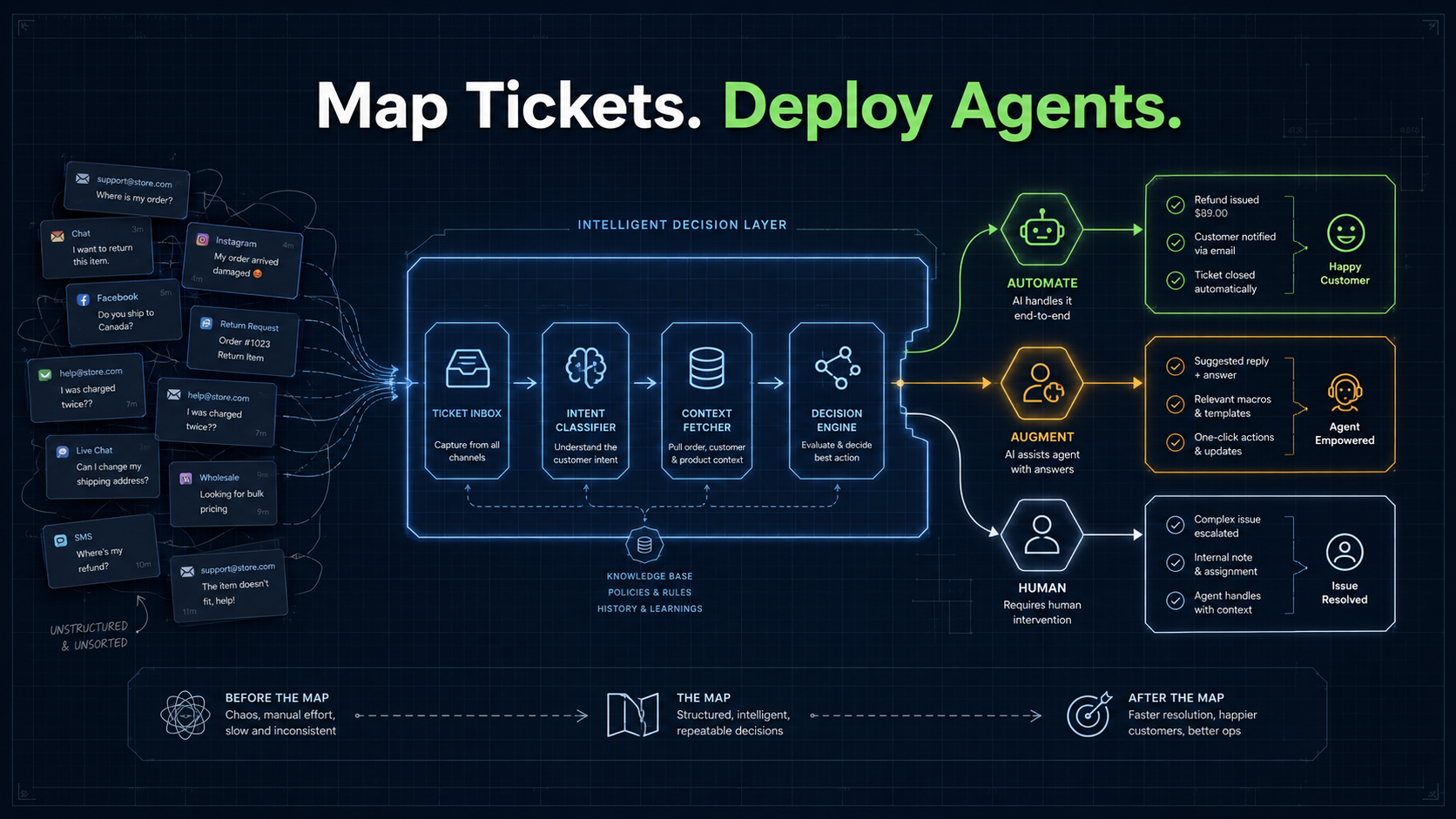
That work is ticket mapping - the process of taking your raw support volume, understanding what is actually inside it, and building a structured decision layer that AI can operate reliably within.
This playbook is the step-by-step guide to doing exactly that.
Save it. Share it with your ops lead or CX head. Come back to it before your next AI agent deployment.
Why Most Shopify Brands Skip This Step
The temptation to skip ticket mapping is completely understandable. Shopify brands move fast. The support queue is already overflowing. The promise of AI deflection sounds like immediate relief.
So the instinct is to plug in an AI tool and start.
But here is the operational reality: an AI agent deployed without a mapped decision layer is like a new hire who has never read your SOPs, does not know your return policy, cannot see the live order status, and has been told to "just be helpful."
They will try their best. It will not be good enough.
The root cause is almost never the AI model itself. It is one of three things:
- No intent taxonomy - the AI does not know what kinds of questions it is dealing with, so it cannot route or resolve confidently.
- No policy-to-flow mapping - the AI knows the question but has no reliable path to a resolution.
- No live data connection - the AI is answering questions about orders, shipments, and returns without access to what is actually happening in real time.
Ticket mapping solves all three before deployment begins.
What You Will Build With This Playbook
By the end of this five-step process, you will have:
- A ticket intent taxonomy specific to your Shopify brand
- A volume and automability map showing where AI creates the most leverage
- A policy-to-flow document that connects every major intent to a resolution path
- A decision layer spec your engineering, ops, or implementation partner can build from
- A deployment readiness checklist to evaluate whether your stack is ready
This is not a theoretical exercise. It is the exact mapping work InovaBeing does in the first two weeks of every support AI engagement with a Shopify brand.
Step 1: Audit Your Ticket Volume and Find the Real Distribution
Before you classify anything, you need to understand what is actually in your queue. Most brands think they know their top ticket types. They are usually wrong about the proportions.
How to run the audit
Pull your last 90 days of tickets from your helpdesk (Gorgias, Freshdesk, Zendesk).
Export a flat file with: Ticket ID, Date created, Channel (email, chat, WhatsApp, phone), Tag or category, Resolution time, Agent who handled it, Resolution type.
If your tickets are not tagged yet, pull a random sample of 200–300 tickets and read them manually. That is the fastest way to build a grounded view.
What you are looking for
1. The real intent distribution. In most Shopify DTC brands:
| Intent category | Typical % of total volume |
|---|---|
| Order status / WISMO | 30–45% |
| Delivery issues (delay, missing, failed attempt) | 15–25% |
| Returns and exchanges | 10–20% |
| Product questions | 5–10% |
| Payment and billing queries | 5–8% |
| Cancellations | 3–7% |
| Complaints and escalations | 5–10% |
| Other / miscellaneous | 5–10% |
Your numbers will be different. That is the point of the audit.
2. The hidden complexity inside each category. WISMO is not one intent. It contains:
- "Where is my order?" (order not yet shipped)
- "Where is my order?" (shipped but no update)
- "Where is my order?" (out for delivery, customer anxious)
- "Where is my order?" (delivery failed, needs rescheduling)
Each of these has a different resolution path, a different policy trigger, and a different AI behaviour.
The audit is not done until you understand the sub-intents inside your major categories.
Step 2: Build Your Intent Taxonomy
Now you turn the raw audit into a structured taxonomy that AI can use to reason and route.
An intent taxonomy is a structured, hierarchical classification of every type of support request your brand receives. It is not a list of tags. It is a consistent, mutually exclusive, collectively exhaustive map of customer intents - organised so that every ticket can be placed in exactly one node of the tree.
How to build it
Start with your top-level categories from the audit. Then add two more layers under each one:
- Sub-intent (the more specific variation of the request)
- Resolution type (what the correct outcome looks like)
Example for the WISMO category:
| Top-level intent | Sub-intent | Correct resolution type |
|---|---|---|
| Order status | Order placed, not yet fulfilled | Confirm expected fulfilment window |
| Order status | Order fulfilled, in transit | Share tracking link, confirm ETA |
| Order status | Order out for delivery | Confirm today delivery, manage expectation |
| Order status | Delivery failed, rescheduling needed | Trigger rescheduling flow with logistics partner |
| Order status | Delivered but customer says not received | Initiate investigation, offer replacement or refund based on policy |
Rules for a clean taxonomy
- Mutually exclusive: every ticket fits in one place only
- Operationally grounded: based on your actual data, not your assumption of what customers ask
- Resolution-linked: every intent node has a resolution type attached
- Ownership-tagged: every intent node has a designated owner (AI autonomous, AI with human assist, human only)
Step 3: Score Every Intent for Automability
Not every intent should be automated. The error most brands make is trying to automate everything - or nothing.
The right question is: which intents have the highest automation leverage? Automation leverage = high volume × high automability × high operational cost of manual handling.
The automability scoring matrix
Score every sub-intent on four dimensions, each from 1 to 3:
| Dimension | Score 1 | Score 2 | Score 3 |
|---|---|---|---|
| Volume | Low (< 5%) | Medium (5–15%) | High (> 15%) |
| Resolution clarity | Ambiguous, case-by-case | Mostly clear with some exceptions | Fully rule-based and consistent |
| Data availability | Needs manual lookup | Partly available via API | Fully available via Shopify + logistics APIs |
| Emotional sensitivity | High (angry, distressed) | Medium | Low (routine, factual) |
Add up the scores. Maximum is 12 per sub-intent.
- 9 or above → strong automation candidate
- 6–8 → augmentation candidate (AI assists, human confirms)
- Below 6 → stays fully human
Example scoring for common Shopify intents
| Sub-intent | Volume | Clarity | Data | Sensitivity | Total | Verdict |
|---|---|---|---|---|---|---|
| Order status - in transit | 3 | 3 | 3 | 1 | 10 | Automate |
| Order status - delivered, not received | 2 | 2 | 2 | 2 | 8 | Augment |
| Return request - standard | 3 | 3 | 3 | 1 | 10 | Automate |
| Return request - damaged, high value | 1 | 1 | 2 | 3 | 7 | Augment |
| Complaint - brand experience failure | 1 | 1 | 1 | 3 | 6 | Human |
| WISMO - delivery failed | 2 | 3 | 3 | 2 | 10 | Automate |
| Payment query - failed transaction | 2 | 2 | 2 | 2 | 8 | Augment |
Step 4: Map Policies to Flows
This is the step most brands skip entirely. It is also the most important one.
An AI agent can understand the intent. It can even generate a sympathetic response. But without a clear policy-to-flow map, it cannot resolve the ticket reliably or consistently.
For every automatable or augmentable sub-intent, you need:
- The policy - what is the official rule or standard the resolution follows?
- The conditions - what variations trigger different paths?
- The data required - what does the AI need to look up to apply the policy?
- The actions - what does the AI actually do to resolve the ticket?
- The escalation trigger - what condition causes the AI to hand off to a human?
Example: Standard return request
Intent: Return request - standard (item within return window, no damage claim)
Policy: Customers may return any item within 7 days of delivery. Refund to original payment method processed within 3–5 business days. Exchange processed within 2 business days.
Conditions and paths:
| Condition | Path |
|---|---|
| Within return window + item eligible | Issue return label, confirm refund timeline |
| Outside return window | Explain policy, offer goodwill exchange at agent discretion |
| Item marked non-returnable | Explain policy, escalate if customer disputes |
| High-LTV customer outside window | Route to human for retention handling |
Data required: Order date and delivery date (Shopify), Item SKU and category, Customer LTV (CRM or Shopify tags), Return window policy.
Actions: Generate return label via logistics API, Update Shopify order with return-initiated tag, Send confirmation message with return instructions and refund timeline.
Escalation trigger: Customer sentiment below threshold, Dispute over policy, Order value above ₹X, Item marked fragile, custom, or non-returnable.
Do this for every intent that scored 7 or above
The policy-to-flow map does not need to be a technical document yet. It needs to be a clear, human-readable spec that a product or implementation team can translate into agent logic.
Think of it as the equivalent of a well-written SOP, except written specifically for an AI system that will execute it thousands of times.
Step 5: Build the Decision Layer and Plug In the Agents
Now, and only now, you are ready to deploy. But you are not deploying into a raw ticket queue. You are deploying into a structured decision layer that has four components.
Component 1: Intent Classifier
When a ticket arrives, the intent classifier reads the message and maps it to the correct node in your intent taxonomy.
This is not a keyword matcher. It is a model trained or prompted on your specific taxonomy, your brand's language, and your customer base's phrasing.
A good intent classifier does three things reliably:
- Maps the ticket to the correct top-level category
- Maps it to the correct sub-intent within that category
- Flags low-confidence classifications for human review instead of guessing
The classifier is only as good as the taxonomy you built in Step 2.
Component 2: Context Fetcher
Once the intent is classified, the system needs live data before it can act. The context fetcher pulls the relevant operational data in real time:
- Order status, fulfilment date, tracking number from Shopify
- Shipment scan events and delivery status from your logistics partner
- Return eligibility and window from your policy rules
- Customer segment, LTV tier, and order history from Shopify or CRM
- Previous ticket history and resolution type from your helpdesk
This is the component most AI deployments are missing. Without live context, the AI is answering in the dark. It does not know if the order is delayed. It does not know if the customer is a VIP. It does not know if a return window has expired.
The context fetcher is what turns an AI chatbot into an operational agent.
Component 3: Decision Engine
This is the policy-to-flow map from Step 4, translated into executable logic.
The decision engine takes the classified intent and the live context and evaluates them against your mapped policies to determine which resolution path applies, whether the AI can resolve autonomously or needs human input, what actions to trigger, and whether to escalate and to whom.
The decision engine is where your business rules live. It is not an AI model making it up as it goes. It is a structured, auditable set of conditional logic built from your own policies, with AI handling the language and communication layer on top.
This separation matters. Policy logic belongs in the decision engine, not inside the AI prompt. When you mix both, you lose control of consistency and auditability.
Component 4: Action Layer
The final component executes the decision. The action layer connects to your live systems and performs the actual resolution:
- Updates Shopify order status or tags
- Generates and sends a return or exchange label
- Triggers a refund via your payment gateway
- Sends a message to the customer via email, WhatsApp, or chat
- Creates or updates a helpdesk ticket with resolution notes
- Routes to a human agent with a pre-filled summary if escalation is needed
The action layer is what makes the AI genuinely useful, not just conversational. A system that understands the intent, fetches the context, evaluates the policy, and then only sends a message - but cannot update the order, issue the label, or log the resolution - is not an operational agent. It is an expensive auto-responder.
The Full Decision Layer Architecture for Shopify Support
Ticket arrives (email / chat / WhatsApp / voice)
          ↓
[ Intent Classifier ]   →  Maps ticket to sub-intent in your taxonomy
          ↓
[ Context Fetcher ]     →  Pulls live data: Shopify order, logistics, customer LTV, history
          ↓
[ Decision Engine ]     →  Evaluates policy-to-flow map against intent + context
                           Determines: Automate / Augment / Escalate to Human
          ↓
[ Action Layer ]        →  Executes resolution: update Shopify, send message,
                           issue label, process refund, or route to agent
          ↓
Resolution logged → feeds back into taxonomy and scoring
Every component maps back to the five steps in this playbook:
| Playbook step | Decision layer component |
|---|---|
| Step 1: Audit | Feeds volume and distribution data |
| Step 2: Intent taxonomy | Powers the intent classifier |
| Step 3: Automability scoring | Determines automate / augment / human routing |
| Step 4: Policy-to-flow map | Powers the decision engine |
| Step 5: Decision layer build | Intent classifier + context fetcher + decision engine + action layer |
Deployment Readiness Checklist
Before you go live with AI agents on your Shopify support stack, run through this checklist.
Taxonomy and classification
- Intent taxonomy built from real ticket data (not assumptions)
- Sub-intents defined for every major category
- Automability scores assigned to all sub-intents
- Automate / augment / human ownership confirmed for each
Policy and flows
- Policy statements documented for every automate and augment intent
- Conditions and resolution paths mapped for each policy
- Escalation triggers defined for every automated flow
- Exception handling documented (what happens when data is missing?)
Data and integrations
- Shopify webhooks configured for order events
- Logistics API connected for real-time shipment data
- Customer LTV or segment data accessible at query time
- Helpdesk integration live (tickets can be created, updated, tagged)
Testing and oversight
- Test suite of 50–100 real historical tickets run through the classifier
- Classification accuracy above 85% before going live
- Human review queue configured for low-confidence classifications
- Escalation paths tested end-to-end
- Weekly review cadence set up for the first 60 days post-launch
Common Mistakes to Avoid
Mistake 1: Deploying before the taxonomy exists
The most common failure mode. Fix: Complete Steps 1–3 before any technical deployment begins.
Mistake 2: Writing policies in the AI prompt instead of the decision engine
Many teams try to stuff all their business logic into a system prompt. This creates AI responses that are inconsistent at scale because prompts are probabilistic. Fix: Move policy logic into the decision engine. Use AI for language and communication, not policy execution.
Mistake 3: No live data connection
Deploying an AI agent that answers questions about orders, shipping, and returns without access to live Shopify and logistics data is not support automation - it is a better FAQ page. Fix: Context fetcher must be connected before agents go live on transactional intents.
Mistake 4: Automating too many intents too early
Brands often try to automate everything in the first sprint. Fix: Launch with 3–5 intents maximum. Expand in 30-day cycles.
Mistake 5: No human review layer for the first 60 days
Even a well-mapped system will have edge cases it has not seen before. Fix: Keep a lightweight review queue live for the first two months. Use it to refine the taxonomy and improve the classifier.
What This Looks Like as a Timeline
For a Shopify brand starting from scratch on this playbook, here is a realistic implementation timeline:
| Week | Activity | Owner |
|---|---|---|
| Week 1 | Ticket audit - pull 90 days of data, identify top intents | CX lead or ops |
| Week 1–2 | Intent taxonomy build - classify sub-intents, assign resolution types | CX lead + partner |
| Week 2 | Automability scoring - score every sub-intent, confirm verdicts | CX lead + partner |
| Week 2–3 | Policy-to-flow mapping - document policies and resolution paths | CX lead + ops |
| Week 3–4 | Decision layer build - classifier + context fetcher + decision engine | Engineering / partner |
| Week 4 | Action layer integration - Shopify, logistics, helpdesk connections | Engineering / partner |
| Week 4–5 | Testing sprint - run historical tickets, validate classifier accuracy | Engineering + CX |
| Week 5–6 | Soft launch - live on top 3 intents with human review queue active | CX + partner |
| Week 6–8 | Refinement cycle - expand intents, tune decision engine | Engineering + CX |
| Week 8+ | Full production - expand to all automate and augment intents | Engineering + CX |
Conclusion: The Map Comes Before the Territory
There is a reason experienced operators do not hand new hires the phone on day one without training, SOPs, and a clear escalation path. The same principle applies to AI agents.
Deploying an AI agent into an unmapped, undocumented, data-blind support operation is not automation. It is chaos with a chatbot on top.
The brands that get AI support right in 2026 are the ones who do the unglamorous mapping work first. They audit the tickets. They build the taxonomy. They score the intents. They document the policies. They define the flows.
And then - with a live decision layer underneath - they deploy AI agents that resolve with consistency, speed, and the right operational context every single time.
That is the difference between AI as a cost centre experiment and AI as a genuine operational moat.
Ready to map your support into an AI decision layer? In a focused 60-minute working session, InovaBeing will review your current ticket volume and top intent categories, map your highest-leverage automation candidates, show you what a decision layer looks like on your actual stack, and give you a clear 6-week deployment roadmap. No slides. No pitch deck. Just a working session with your ops data. Book a Support Ticket Mapping Session.